Web UI
Web UI#
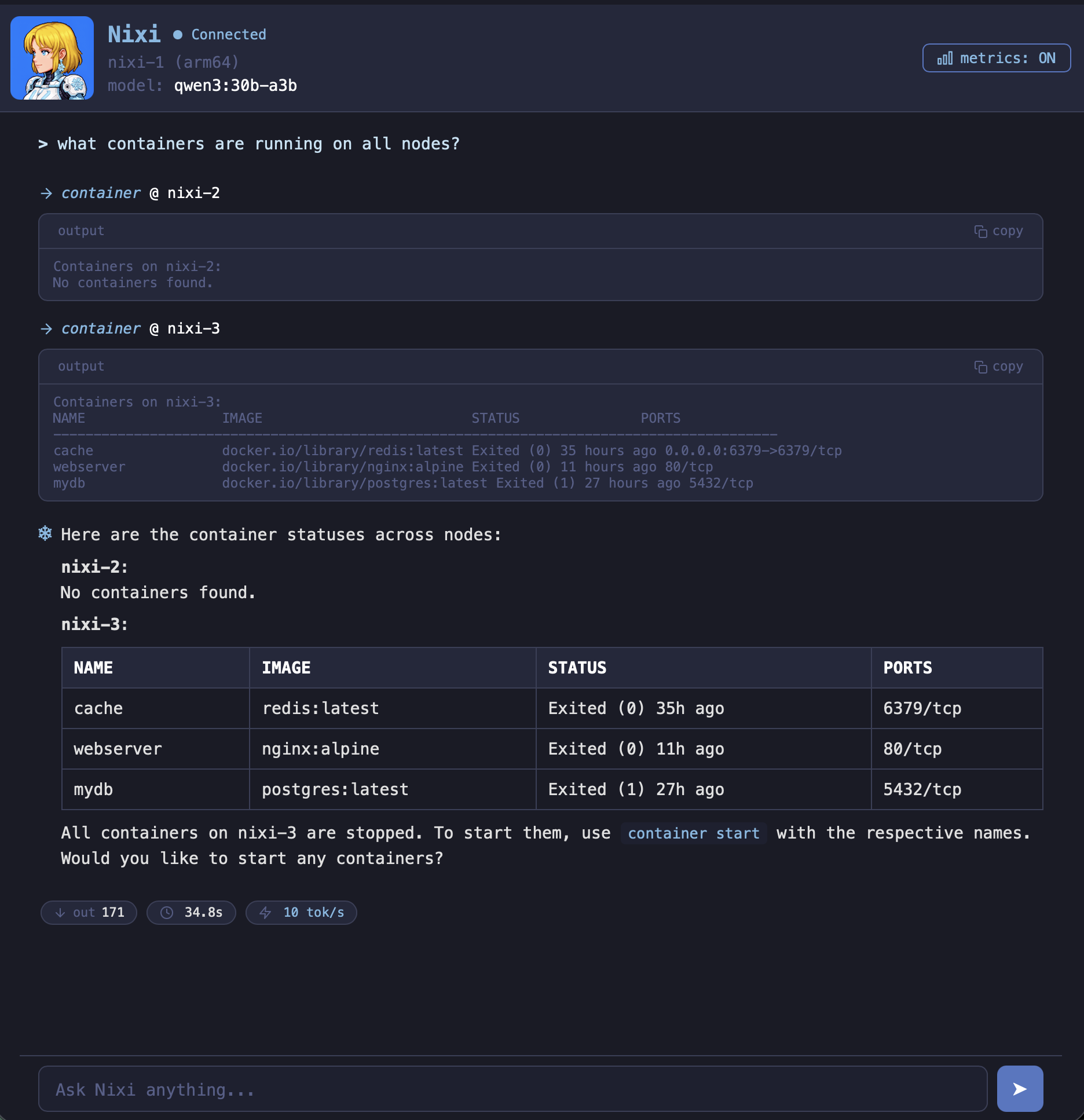
Nixi includes a browser-based web UI with full feature parity to the terminal TUI. It runs as a persistent daemon so you can access your Nixi instance from any device on your network – no SSH or terminal needed.
Quick Start#
Start the web daemon:
nixi serve
On first run, Nixi generates a password and prints it to the terminal:
Generated web UI password: e7fa6c2d8a573cacffa8236b
Save this password — you can also retrieve a new one with 'nixi auth --set'.
Then open http://your-host:6494 in a browser and log in with the password. Port 6494 is the default (“NIXI” on a phone dial pad).
Authentication#
The web UI is password-protected. A random password is generated automatically on first nixi serve and saved to the config file as a bcrypt hash. Sessions are stored as signed httpOnly cookies (30-day expiry).
Managing the password#
nixi auth          # check if authentication is configured
nixi auth --set    # set a new password (prompts for input, empty for random)
The password prompt is hidden (not echoed to the terminal). If you leave it empty, a random password is generated and displayed. If you lose your password, run nixi auth --set to set a new one (requires SSH access to the server).
Config file#
The password hash is stored in ~/.config/nixi/config.toml:
[web]
port = 6494
host = "0.0.0.0"
password_hash = "$2a$10$..."
Do not edit password_hash directly – use nixi auth --set to generate valid bcrypt hashes.
Configuration#
Port and bind address#
Via CLI flags:
nixi serve --port 8080 --host 127.0.0.1
Via config file (~/.config/nixi/config.toml):
[web]
port = 6494
host = "0.0.0.0"
Via environment variables:
| Variable | Description | Default |
|---|---|---|
NIXI_WEB_PORT | Web UI port | 6494 |
NIXI_WEB_HOST | Bind address | 0.0.0.0 |
Setting host to 0.0.0.0 (the default) makes the web UI accessible from other devices on your LAN. Set to 127.0.0.1 to restrict to localhost only.
NixOS Module#
The NixOS module can run the web daemon as a systemd service:
services.nixi = {
  enable = true;
  package = inputs.nixi.packages.aarch64-linux.default;

  web = {
    enable = true;       # start the web UI daemon
    port = 6494;         # default
    host = "0.0.0.0";   # default
  };
};
This creates a nixi-web systemd service and opens the port in the NixOS firewall automatically.
systemctl status nixi-web    # check the daemon
journalctl -u nixi-web -f    # follow logs
Non-NixOS (systemd user service)#
The install script can set up a systemd user service for you. To do it manually:
mkdir -p ~/.config/systemd/user

cat > ~/.config/systemd/user/nixi-web.service << EOF
[Unit]
Description=Nixi Web UI
After=network.target

[Service]
ExecStart=$(which nixi) serve --port 6494
Restart=on-failure
RestartSec=5

[Install]
WantedBy=default.target
EOF

systemctl --user daemon-reload
systemctl --user enable --now nixi-web.service
Features#
The web UI has full parity with the TUI:
- Streaming responses – tokens appear in real-time as the LLM generates them, rendered as markdown on completion
- Slash commands – type
/to see the autocomplete dropdown, navigate with arrow keys, select with Tab or Enter - Model switching –
/modelwith autocomplete from available server models - Cancel – press ESC or click the Cancel button to stop a running response
- Tool calls – tool names and results are displayed inline, long results are collapsible
- Confirmation prompts – mutations that need approval show Yes/No buttons
- Metrics – token counts, elapsed time, and generation speed shown after each response
- Message queuing – type while Nixi is thinking and your messages are queued and sent in order
- Theme toggle –
/themeswitches between dark and light mode (persisted in browser) - Memory –
/memorieslists saved memories, auto-recall works the same as the TUI - Multi-node –
/nodes,/system, and/adoptwork the same as the TUI - Sensitive data redaction – passwords, tokens, and API keys are redacted in tool output
Sessions#
Each browser tab creates an independent session with its own agent and conversation history. This mirrors the TUI behavior where each terminal is a separate session. Opening multiple tabs lets you run parallel conversations.
How It Works#
The web UI is a single-page application embedded directly in the nixi binary (via Go’s embed package). No external files or CDN dependencies are needed – the binary is fully self-contained.
Communication uses a WebSocket connection at /ws. The server translates agent streaming events into JSON messages and sends them to the browser in real-time. See Architecture for protocol details.
Firewall#
If you’re behind a firewall, make sure port 6494 (or your configured port) is open:
NixOS (handled automatically by the module):
networking.firewall.allowedTCPPorts = [ 6494 ];
iptables:
sudo iptables -I INPUT -p tcp --dport 6494 -j ACCEPT
Reverse Proxy (optional)#
For a friendly URL like nixi.home.local, put a reverse proxy in front:
Caddy (/etc/caddy/Caddyfile):
nixi.home.local {
    reverse_proxy localhost:6494
}
Nginx:
server {
    listen 80;
    server_name nixi.home.local;

    location / {
        proxy_pass http://127.0.0.1:6494;
        proxy_http_version 1.1;
        proxy_set_header Upgrade $http_upgrade;
        proxy_set_header Connection "upgrade";
        proxy_set_header Host $host;
    }
}
You’ll also need a local DNS entry (e.g. in your router or /etc/hosts) pointing nixi.home.local to your controller’s IP.